The Platform allows awarding the Bid using two distinct approaches:
- Awarding before reaching the deadline for submission of offers:
- This applies only if at least one Supplier has submitted an offer for at least one Position before the deadline for submission of offers.
- If no offers are received for at least one Position, the RDO will pass to status
 , from which it can be permanently closed or reopened by modifying the deadline for submission of offers.
- Awarding upon reaching or exceeding the deadline for submission of offers:
- This applies only if at least one Supplier submitted an offer for at least one Position before the deadline for submission of offers.
- IMPORTANT: The possibility of awarding upon exceeding the deadline for submission of offers is valid even for those RDOs that have completed one or more Negotiation Cycles.
The awarding of the RDO is based on a series of actions that the internal Platform User can take on the individual Positions for which offers have been submitted by the Supplier:
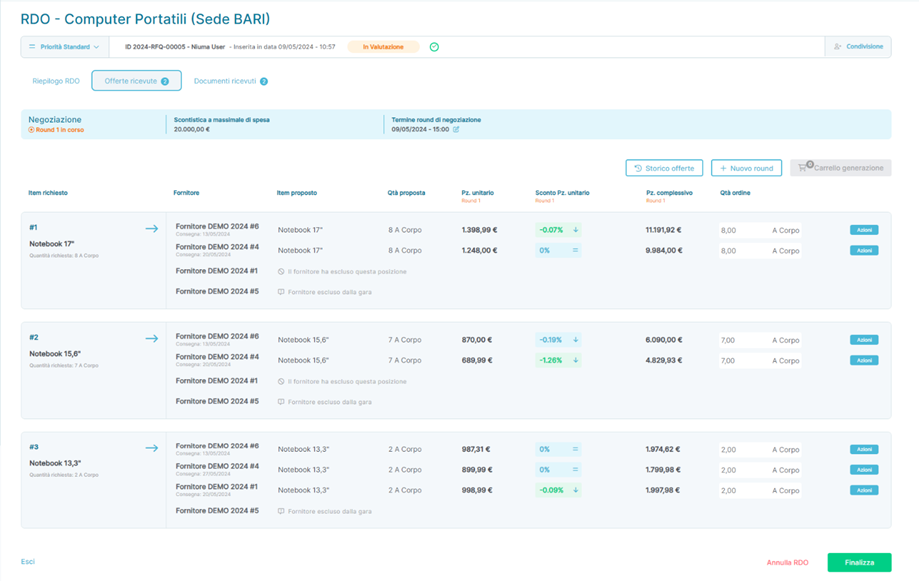
Example of a Request for Quotation (RDO) in the fourth Negotiation Round with awardable Positions.
The information present in the Comparison Matrix of Offers is grouped as follows:
Field | Description |
Requested Items | Allows viewing the Positions for which an Offer has been requested from the Suppliers. The display of the entire Matrix is based on this field, and for each invited Supplier, it is possible to view the specific Offer status for the requested Item. Each requested Item is visually separated from all others. |
Supplier | Allows viewing the Supplier invited to the Bid. The Supplier is repeated in the Matrix as many times as there are requested Items. |
Proposed Item | Reports, for each Supplier and for each requested Item, any variations in the name of the Position compared to the requested Items (if applicable). |
Proposed Quantity | Reports, for each Supplier and for each requested Item, the quantity requested by the Platform User for the requested Items in the Bid and the related unit of measure. |
Unit Price | Reports, for each Supplier and for each requested Item, the unit price associated with the requested Item. |
Discount per Unit Price | Reports, for each Supplier and for each requested Item, the percentage discount applied compared to the Offer previously submitted by the Supplier. IMPORTANT: This field is populated only if at least one entry has been made in a Negotiation Round. |
Total Price | Reports, for each Supplier and for each requested Item, the total price of the Offer submitted by the Supplier, calculated as Unit Price * Proposed Quantity. |
Order Quantity | Reports, for each Supplier and for each requested Item, the same information as the Proposed Quantity field; however, in this field, it is possible to modify the quantities proposed by the Supplier if partial awarding of a Proposed Item is desired. IMPORTANT #1: The Platform prevents entering an Order Quantity > Proposed Quantity. IMPORTANT #2: The Platform prevents modifying the unit of measure. |
 | Allows, for individual Supplier and for individual Item required, to enter the Position with the quantities reported in the Order Quantity field within the  |
The awarding process involves these steps:
- The Platform User analyzes the Comparison Matrix of Offers and identifies which Positions to award to one or more Suppliers.
- The awarding of the Position can also be partial: in this scenario, the Platform User can modify the value present in the Order Quantity column before performing the actions described next.
- Once the Positions to be awarded are chosen, it is possible to click on the button
 present next to each Position for which Offers have been received, which will show the button
  : if pressed, the Platform will insert the Position into the generation Cart, the counter of Positions to convert into ODA increases as the selected Positions for awarding increase.
 - A selected Position added to the generation Cart will be highlighted in the Matrix and identified with the icon
 .
. - A selected Position added to the generation Cart can be removed from the generation Cart by clicking the button
 and then on
  the Position that you no longer wish to award or for which you want to make modifications to the Order Quantity before possibly reinserting it into the generation Cart.
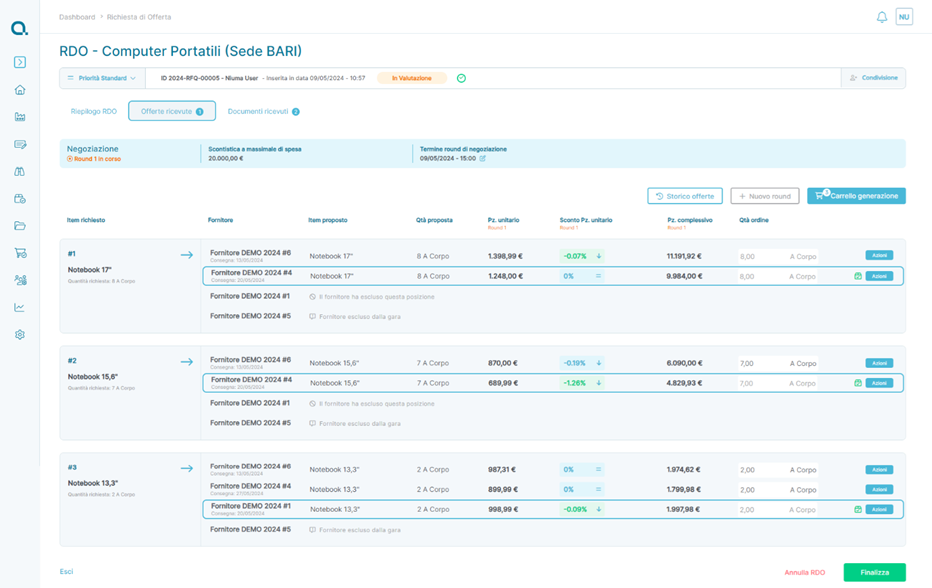
Example of a Request for Quotation (RDO) with Positions selected for awarding
If the chosen Positions do not need further modification, the Bid can be awarded by pressing the button  . Upon confirming the generation of the ODA containing the selected Positions, the RDO will automatically pass to status
- IMPORTANT #1: The transition to status does not block the visibility of the button for all those Bid Positions that have not been included in an ODA during the initial awarding.
- The Bid passed to status
 has generated as many ODAs in Draft status as there are winning Suppliers of at least one Position included in the ODA
  .
.
IMPORTANT: Before making the award , the Bid can be canceled using the button  .
.
The Bid can be  canceled by pressing the button
  only if it has reached/exceeded the date indicated in the Deadline for Submission of Offers field. For a Bid in status, no further actions can be performed, but it will always be possible to view all data of the Bid in consultation mode.
Was this article helpful?
That’s Great!
Thank you for your feedback
Sorry! We couldn't be helpful
Thank you for your feedback
Feedback sent
We appreciate your effort and will try to fix the article