In the ‘Initial Ranking’ tab or in the ‘<n> Negotiation Cycle’, if negotiations have occurred, the internal user can initiate the tender award process, which consists of two phases:
- Pre-award: Managed by the user responsible for the tender.
- Award: Managed by the Purchasing Manager, where configured, or the user responsible for the tender, by clicking the
 button
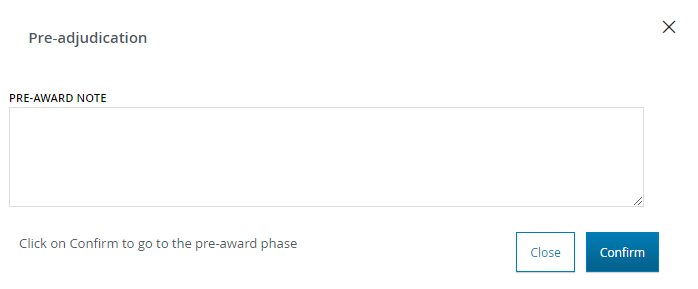
When opening the pre-award phase, the system will verify if the number of negotiation rounds matches the number indicated in the ‘Number of expected relaunches’ field during the tender configuration. If these numbers do not match, the system will obligatorily prompt the buyer to insert a note. Therefore, when clicking on the ‘Open Pre-Award’ button, a pop-up will appear requiring the insertion of a note. If the number of expected rounds matches the number of rounds conducted, the pop-up will optionally request the insertion of any pre-award notes.
On the ‘Final Ranking’ page, in the ‘Actions’ column, the  icon is now visible, and the internal user can select the supplier to pre-award the tender. A pop-up will be open, and the internal user can confirm the selected choice.
Upon confirmation, the ‘Final Ranking’ page is displayed again, and in the ’Supplier Ranking’, the record corresponding to the pre-awarded supplier will be highlighted, and a  icon will be displayed to the left of its name in the ‘Supplier’ column
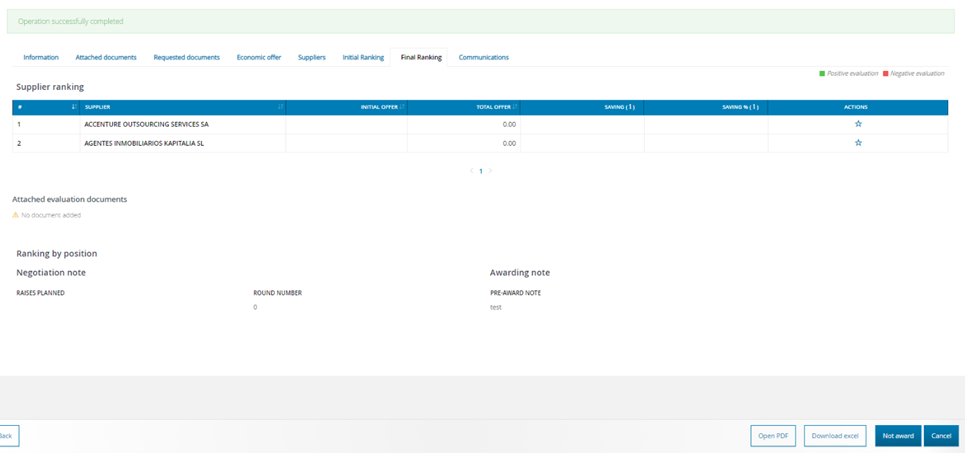
The internal user can change his choice until the pre-award phase is closed.
To close this phase, the internal user can click on the "Close pre-award" button and confirm the choice in the pop-up that will be opened to ask for confirmation.
In the footer, the following buttons are available:
- Open PDF: This button allows the internal user to access a report of the entire tender process up to the award, which can be exported in PDF format.
Was this article helpful?
That’s Great!
Thank you for your feedback
Sorry! We couldn't be helpful
Thank you for your feedback
Feedback sent
We appreciate your effort and will try to fix the article