Throughout all phases of the tender, you will have access to the ‘Tender Timeline’, highlighted by the  section available in the ‘Information’ tab. The tender timeline provides an overview of the key milestones and events that have occurred during the tender process

Click on  to open a window that displays a tabular report of the planned and actual dates of the tender, including any variations (Delta field) between them. This timeline report provides a clear overview of how the tender's schedule has progressed and highlights any deviations from the original plan:
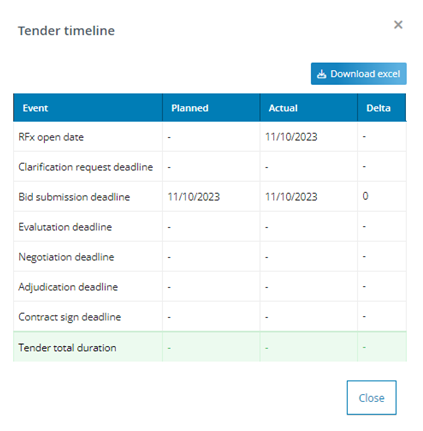
In the ‘Planned’ column, the internal user will find the reference values entered during the tender preparation phase.
In the ‘Actual’ column, the internal user will see the dates recorded by the system in correspondence with the relative actions:
- RFx submission date: The date on which the user publishes the tender.
- Deadline for clarification request: This date differs from the planned value only if it was modified during the tender phase.
- Deadline for submission of tenders: This date differs from the planned value only if it was modified during the tender phase.
- Deadline for evaluation of offers: The date of the opening of the evaluation phase.
- Negotiation deadline: The closing date of the pre-award phase.
- Assignment deadline: The closing date of the pre-award phase.
- Contract signature deadline: Currently, there is no "actual" value for this field, and as a result, the calculation of the ‘Total duration of the tender procedure’ excludes this data.
The internal user can also have the option to export this tabular report in Excel format by clicking on the ‘Download Excel’ button. This export provides a convenient way to analyze and document the timeline of the tender process
Was this article helpful?
That’s Great!
Thank you for your feedback
Sorry! We couldn't be helpful
Thank you for your feedback
Feedback sent
We appreciate your effort and will try to fix the article