During the pre-award phase, if the received offers do not meet the requirements of the purchasing department, negotiations can be initiated to adjust the proposed economic offers. To do this, you can activate the ‘Negotiation’ feature by clicking on the  button located within the ‘Initial Ranking’. This action will add a new ‘Negotiation’ tab and make it visible to the user.
On this page, the user can choose the suppliers to invite to the negotiation by selecting the respective checkboxes in the ‘Selection’ column of the ‘Suppliers’ table.
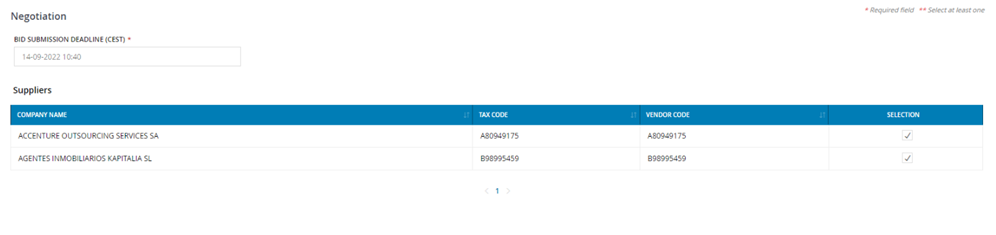
The user is also required to set the ‘Deadline for submitting offers’ for the negotiation process being configured. After entering this information, the user must save the configuration of the negotiation process by clicking the ‘Save’ button. This action will redirect them to the summary page of the newly configured negotiation round.
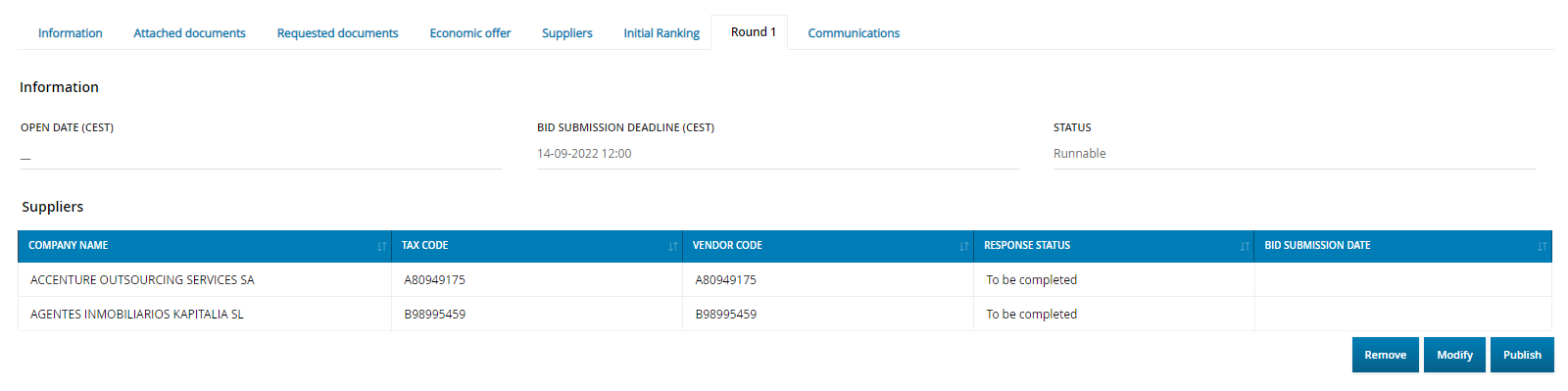
At this stage, the round is not yet active, and from this page, the user can choose to delete its configuration using the ‘Remove’ button, modify it with the ‘Edit’ button, or activate and publish it with the ‘Publish’ button. The ‘Publish’ operation signifies the official opening of the Negotiation phase, and an email invitation will be sent to the selected suppliers.
During the negotiation phase, invited suppliers can submit their new economic offers within the specified deadline. The internal user can adjust the deadline for offer submissions at any time until the negotiation phase changes to the ‘Closed’ status by using the  icon.
icon.
After the deadline for offer submissions has expired, the new offers will undergo a new phase of ‘Economic Evaluation’, following the same steps as described earlier.
Once the economic evaluation of the negotiation process is completed and closed, the internal user can review the details of the updated ranking in the ‘<n> Negotiation cycle’ tab. This tab follows the same structure as the ‘Initial Ranking’ tab.
The internal user can continue configuring new negotiation cycles until the offer obtained meets the expectations of the purchasing department, and the internal user decides to proceed with the tender award.
Was this article helpful?
That’s Great!
Thank you for your feedback
Sorry! We couldn't be helpful
Thank you for your feedback
Feedback sent
We appreciate your effort and will try to fix the article