On this page, as shown below, you can review the main information related to the contracts that have already been created:
Here’s the description for each field in the Contracts details:
- Contract Code: This is a unique identifier for the contract, allowing for easy reference and retrieval of the specific contract.
- Legal Entity: Specifies the legal entity or business owner within the organization responsible for the contract, which could be either "doValue GR" or "doValue Real Estate".
- Type of Document: Indicates the execution type of the contract, such as "Single Execution", "Sequential Execution", or other applicable types.
- Object: Describes the purpose or objective of the contract in detail.
- Supplier: Refers to the supplier or vendor associated with the contract.
- Start Date: Specifies the date when the contract becomes effective and is legally binding.
- End Date: Indicates the date when the contract expires or terminates, marking the end of its validity.
- Total Contract Value: Represents the total financial value or amount associated with the contract. This is typically in the currency specified.
- Currency: Denotes the currency in which the contract's Total Contract Value values are expressed.
- DPA: Indicates whether the contract includes a Data Processing Agreement.
- Buyer: Identifies the reference person or contact within the organization responsible for managing or overseeing the contract.
- Contract Status: Shows whether the contract is "Open" or "Closed," providing information on the current state of the contract.
- Document Status: Specifies whether the associated documents within the contract are "Regular" or "Not Regular"
- Actions: Includes a
 button, which allows for the creation of a copy or duplicate of the contract, often used for similar contract agreements.
To access the details of a specific contract, click on the Contract Code number, for instance,  , located under the Contract Code column.
The internal user can also search for particular contracts by entering keywords into the search bar provided:
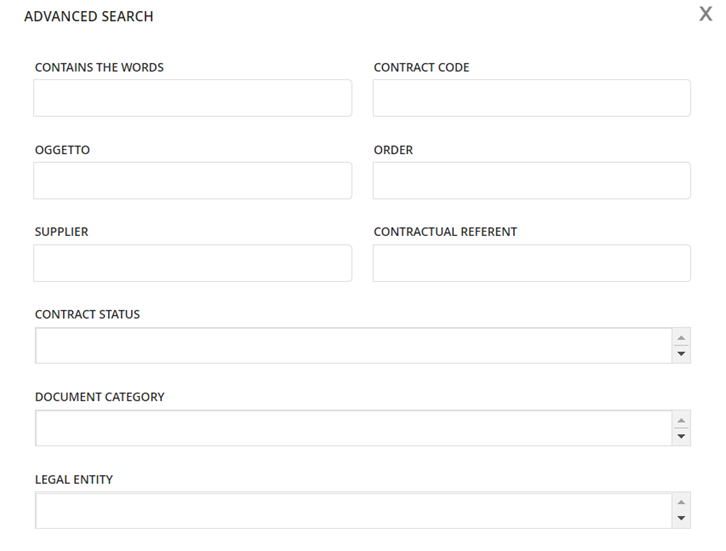
Click the button to access the advanced filtering options and refine your search criteria:
 icon.
icon.
Was this article helpful?
That’s Great!
Thank you for your feedback
Sorry! We couldn't be helpful
Thank you for your feedback
Feedback sent
We appreciate your effort and will try to fix the article