Configurations
The Configurations section provides an overview of the qualification questionnaires and documents required from suppliers, the complete list of available product categories and subcategories, and the automated processes managed by the system, with the option to manually initiate them.
In detail:
- System Emails: Allows you to view the list of email templates configured on the platform.
- Questionnaires: Enables viewing the list of questionnaires provided to suppliers. For each questionnaire, you can see: the title or description (in Italian and English), the relevant product area, the legal form, and the associated geographical area. Through the Actions column, you can view the questions contained within each questionnaire and any attachable documents (file names). This section also allows you to download the questionnaire questions in Excel format.
- Qualification Documents: This section lists the documents that can be requested from the supplier. For each document, the following details are specified:
- The country that issued the document (suppliers based in this country will be invited and/or required to attach it);
- The validity period of the document;
- The product category for which the document is required;
- The obligation to upload the document;
- The SDI association that allows viewing the related questionnaire, if applicable;
Whether the document is subject to expiration, and if so, the relevant expiration date will be shown.
- Product Categories: In this section, you can view the related categories and subcategories by clicking on each product area (see Figure 23).
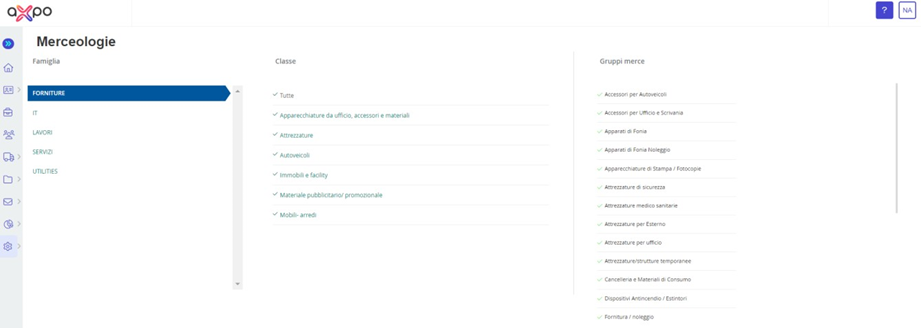
Figure 23. Portale Axpo Portal: Configuration – Products Categories
- Processes: This section allows you to view the automated processes managed by the system, including their description, the date of the last execution, and, if necessary, you can manually initiate the process using the "Start Process" button (see Figure 24).
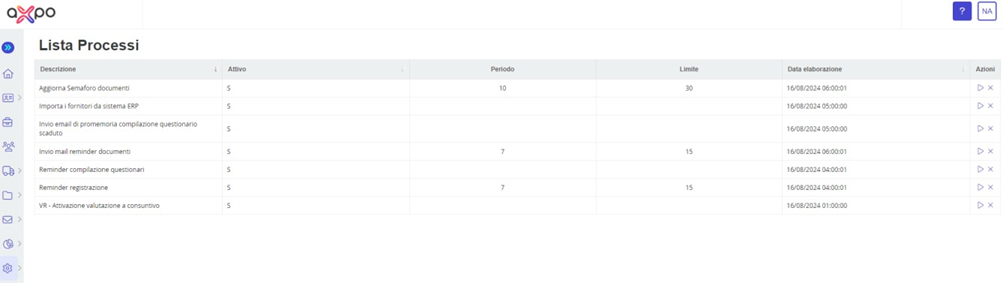
Figure 24. Axpo Portal: Configurations - Processes
Was this article helpful?
That’s Great!
Thank you for your feedback
Sorry! We couldn't be helpful
Thank you for your feedback
Feedback sent
We appreciate your effort and will try to fix the article