The SUPPLIERS REGISTER section allows internal users to access various functionalities for viewing and managing the register. This chapter of the manual is divided into several parts to illustrate the different features of this specific section of the e-Procurement portal. The paragraphs are organized in line with the sections of the register.
Home Page
After logging into the portal, the user will see the Home Page, which consists of the following elements:
A. Header (A)
B. Sidebar Menu (B)
C. Main Content Area (C)
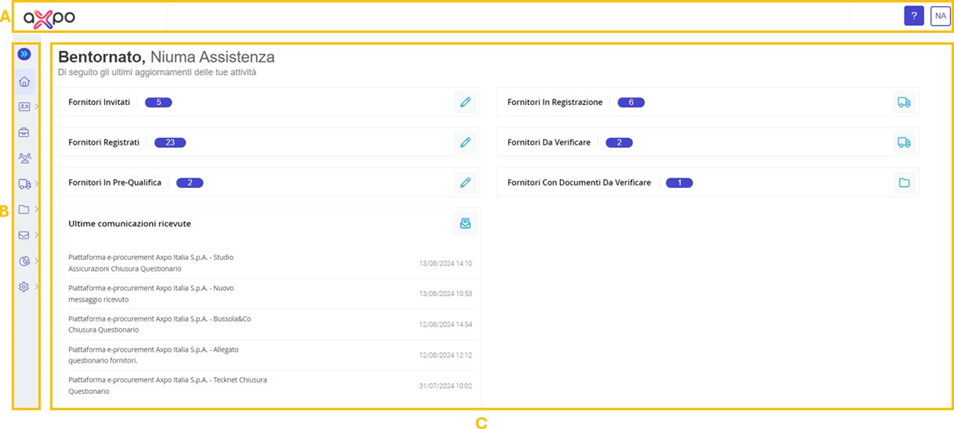
Figure 2. Axpo Platform: Home Page
In the header, both the company logo (A) (see Figure 3) and the user area (C) are visible. The user area displays the name and username of the user, allows selection of the portal's display language between Italian/English, and provides options to change the password and log out. Additionally, users can contact technical support through the designated button with the question mark (?) icon (B).

Figure 3. Axpo Platform: Header
The central part of the Home Page/Activity Overview serves as an informative section related to the functionalities available on the portal.
Depending on the specific user profile, the following shortcuts are displayed and accessible (see Figure 4):
- Invited Suppliers (A): Links to the Suppliers List page filtered by Status = Invited.
- Registered Suppliers (B): Links to the Suppliers List page filtered by Status = Registered.
- Pre-Qualified Suppliers (C): Links to the Vendor List page, containing the list of suppliers in prequalification.
- Suppliers in Registration (D): Links to the Suppliers List page filtered by Status = In Registration.
- Suppliers with Documents to Verify (F): Links to the Document Validation page.
Additionally, users can track recent communications (G) sent by the portal, listed from the most recent to the least recent.
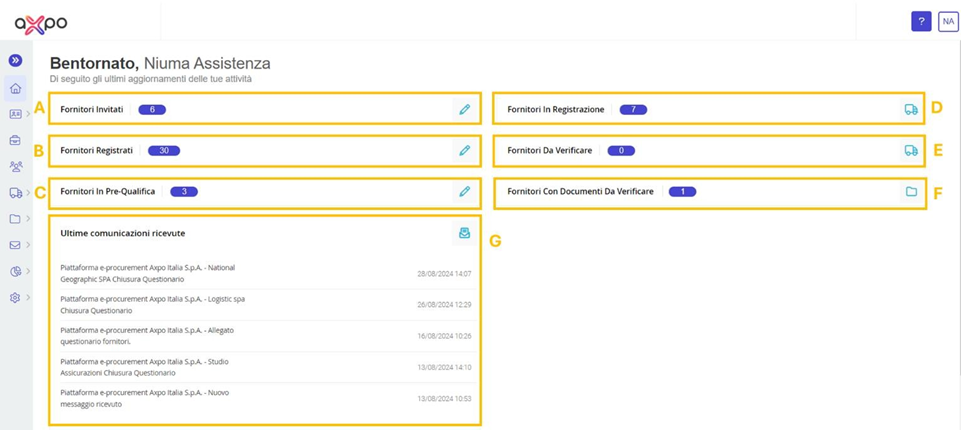
Figure 4. Axpo Platform: central content Area
Was this article helpful?
That’s Great!
Thank you for your feedback
Sorry! We couldn't be helpful
Thank you for your feedback
Feedback sent
We appreciate your effort and will try to fix the article