After logging in to the portal, the user will see the Home Page, consisting of the following elements:
A. Header (A)
B. Side Menu (B)
C. Central part of content (C)
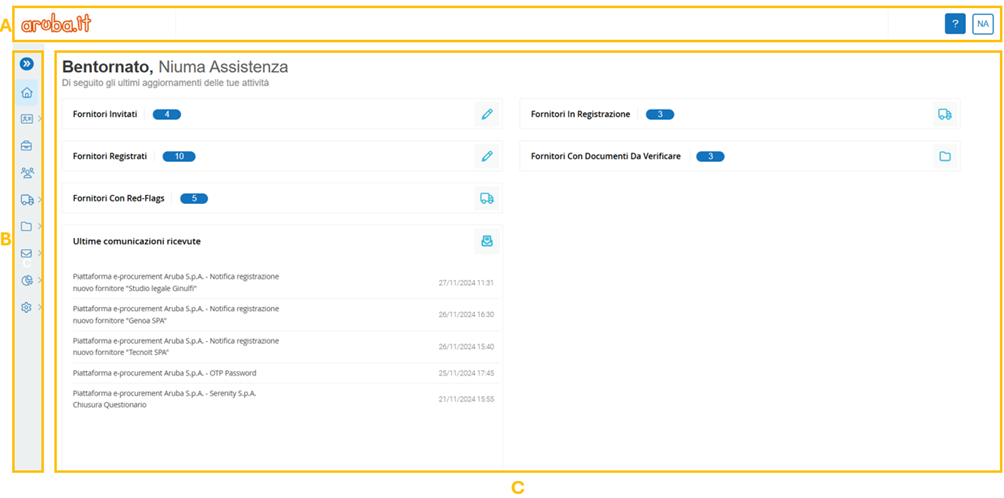 Figure 2. Aruba S.p.A. platform: Home Page
Inside the header, you can see both the company logo (A) (ref. Figure 3) and the user area (C) where you can find the name and username of the user, the possibility of selecting the portal display language between Italian/English and finally, it is possible to change the password and Log-out.
In addition, the user can consult guides and FAQs on how to use the portal using the special button with the question mark icon (?) (B).

Figure 3. Aruba S.p.A. platform: Header
The central part of the Home page/Activity Overview, represents for the user, an information section strictly related to the functionalities used on the portal.
According to the specific user profile, the following short-cuts are displayed and accessible (ref. Figure 4)
- Invited Suppliers (A), which directs to the Suppliers List page filtered by Status = Invited;
- Registered Suppliers (B), which directs to the Suppliers List page filtered by Status = Registered;
- Suppliers With Documents To Be Verified (C), which redirects to the page Document Validation;
- Suppliers in Registration (D), which directs to the Suppliers List page filtered by Status = In Registration;
- Suppliers in Pre-Qualification (E), which directs to the Vendor List page, containing the list of suppliers in pre-qualification;
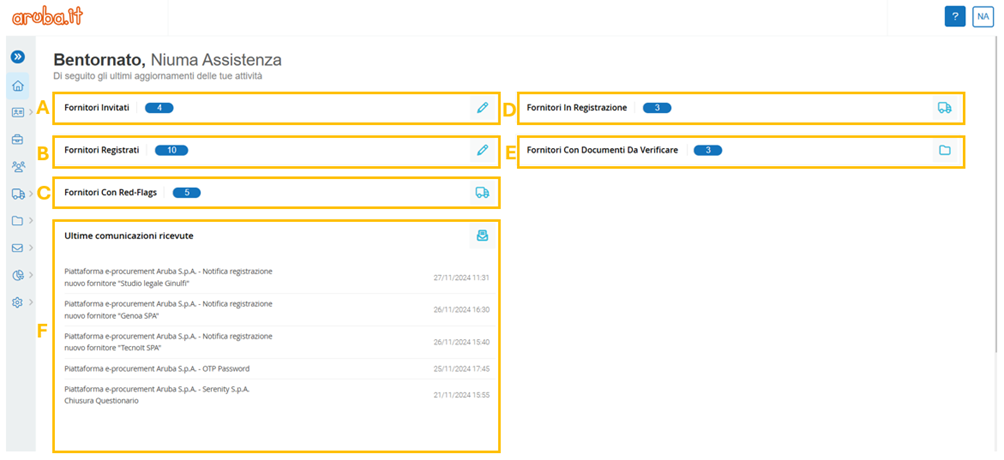
Figure 4. Aruba S.p.A. platform: central part of content
Was this article helpful?
That’s Great!
Thank you for your feedback
Sorry! We couldn't be helpful
Thank you for your feedback
Feedback sent
We appreciate your effort and will try to fix the article