The 'Communications' tab, active only when the RFx status is 'In Progress', contains a list of messages exchanged through the platform between DoValue GR Users and suppliers. These messages are organized in a table displaying the following information: 'Sender', 'Recipients', 'Subject' and 'Sending Date'.

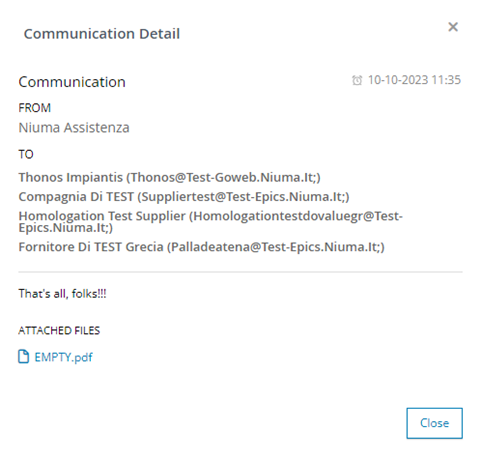
Additionally, there is an 'Actions' column that provides various operations for each communication. Clicking the icon  allows you to view the 'Communication Detail' in a pop-up, as shown in the figure.
The internal user can search and filter the table using the 'Search' field located at the top of the page. By entering text or part of text of interest, the system will automatically display all relevant results available across the pages, considering each field in the table.
Users can send a communication by clicking the 'Send New' button. This action opens a pop-up for composing the message, which includes the following fields: 'Recipients', 'Subject', 'Content', and 'Upload File'.
The user fills in these fields, selecting the recipient(s) of the communication from a drop-down menu with the option to choose one or more entries. The user can also format the 'Content' using the provided text editor.
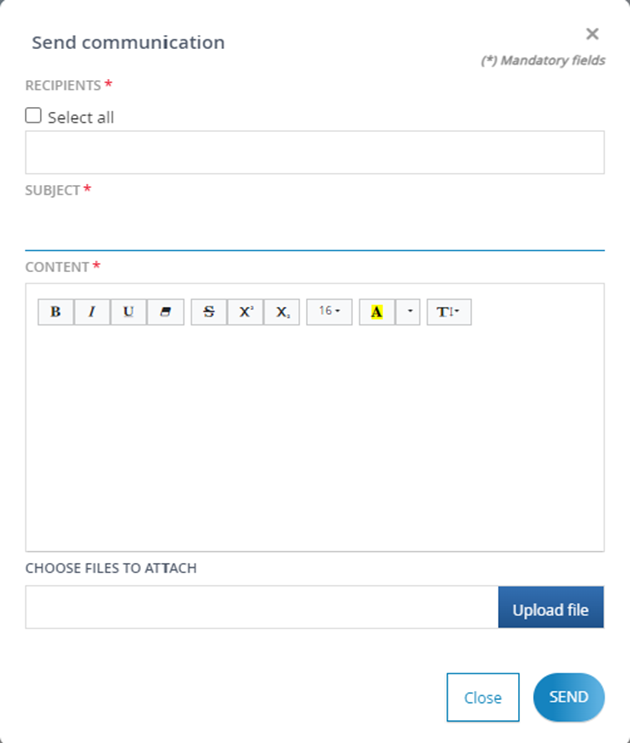
You can also include attachments with your message by clicking on the 'Upload File' field and selecting the file's path on your computer. The system will send an email notification to the recipient(s).
The same functionality is available to the supplier who wants to send a communication to the buyer, and if the tender permits, to the technical evaluator by clicking the 'Send New' button. In this case, a pop-up for composing the message will appear, with the following fields: 'Type of Communication', 'Subject', 'Content', and 'Upload File'.
If the tender includes a 'Technical evaluation' phase, the 'Type of Communication' drop-down menu will allow internal user to choose whether the communication he wants to send is 'Technical Information' or 'Business Information'.
- If you select 'Technical Information', the message will be delivered to both the Buyer of the tender procedure and the technical evaluator.
If you choose 'Business Information', the message will be delivered only to the Buyer of the tender process.
Was this article helpful?
That’s Great!
Thank you for your feedback
Sorry! We couldn't be helpful
Thank you for your feedback
Feedback sent
We appreciate your effort and will try to fix the article