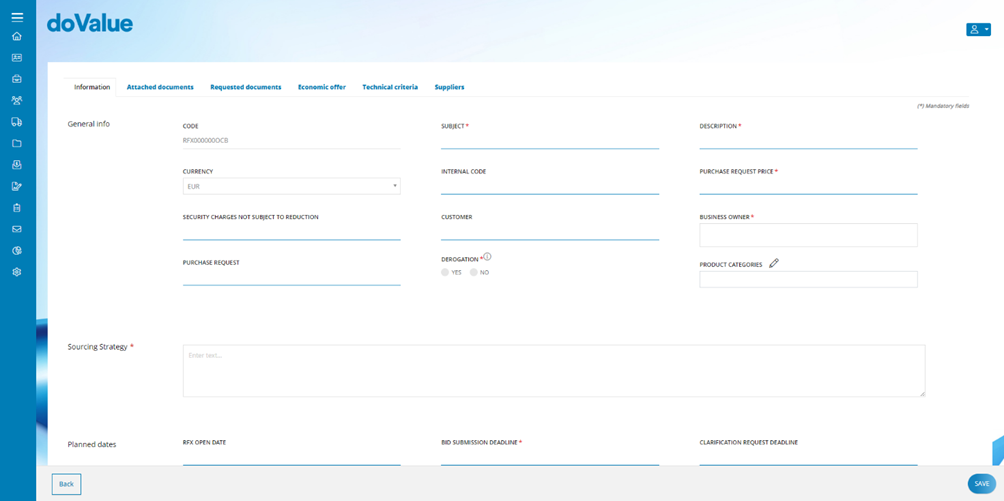
Selecting the Single-lot tender option directs the internal user to the new RFx configuration data entry page, which is divided into various tabs:
- Information
- Attached documents
- Required documents
- Economic offer
- Technical criteria
- Suppliers
At the bottom of the page, you will find the Save button, which allows the internal user to save the data entered across all the above-mentioned tabs. Additionally, there is a Back button that allows the internal user to return directly to the main RFx List page.
- NOTE: By clicking on the 'Back' button, the Platform notify the internal user about any potential data loss if unsaved changes exist.
User input follows a logical order, corresponding to the sequence of tabs mentioned earlier. Upon saving, the system performs a mandatory data check across all sections of the new RFx. If any required information is missing, the system will redirect the internal user to the relevant section.
Once saved, users can still make modifications to the previously entered information by accessing the RFx in the In preparation state and clicking on the Edit button.
Was this article helpful?
That’s Great!
Thank you for your feedback
Sorry! We couldn't be helpful
Thank you for your feedback
Feedback sent
We appreciate your effort and will try to fix the article