Following the completion of the qualification process, suppliers will be able to access the Access Management function from the appropriate “Access Management” menu item.
The supplier-side functionality should allow the referrer to census their employees in the platform, fill out the relevant questionnaire, and finally, attach the necessary documentation.
This documentation may depend on the answers entered within a specific questionnaire in the “Access Management” module, which, in turn, depends on the Security questionnaire.
The “Access Management” module must allow the provider to:
- view the list of employees surveyed in the platform;
- add new employees;
- edit the data entered for the census employees;
- edit the answers entered in the questionnaire;
- deactivate census employees;
- check the status of documents entered for the individual employee.
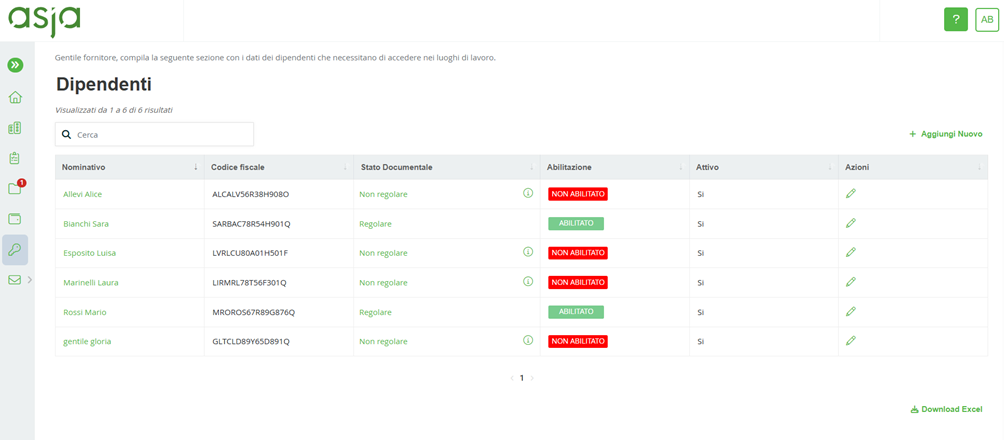
The main screen will consist of a search section and a table containing the list of Employees surveyed in the platform. The following information will be shown for each employee:
- Name, the employee's first and last name.
- Tax Code, the tax code associated with the individual employee.
- Document Status, the status in which the documents entered for the provider are located. It can be regular when they have all been verified and validated or non-regular when one or more documents have been rejected and/or are expired/expired.
- Enabled, status that depends on the regularity of the document section.
- Active, the status of the employee in the platform.
- Actions, where it will be possible to edit the previously completed questionnaire and/or change the documentation entered.
In addition, there is a “Download excel” link that allows you to download, in Excel format, the table containing employee information shown on the same page.
Was this article helpful?
That’s Great!
Thank you for your feedback
Sorry! We couldn't be helpful
Thank you for your feedback
Feedback sent
We appreciate your effort and will try to fix the article