Through the ‘Companies’ section of the portal, the user has the option of taking a census of one or more suppliers in the Supplier Register by clicking on the link ‘Supplier Census’ (B) (ref. Figure 1); as a result, the supplier will be visible in the supplier table without the internal user having to invite the supplier to register on the portal.
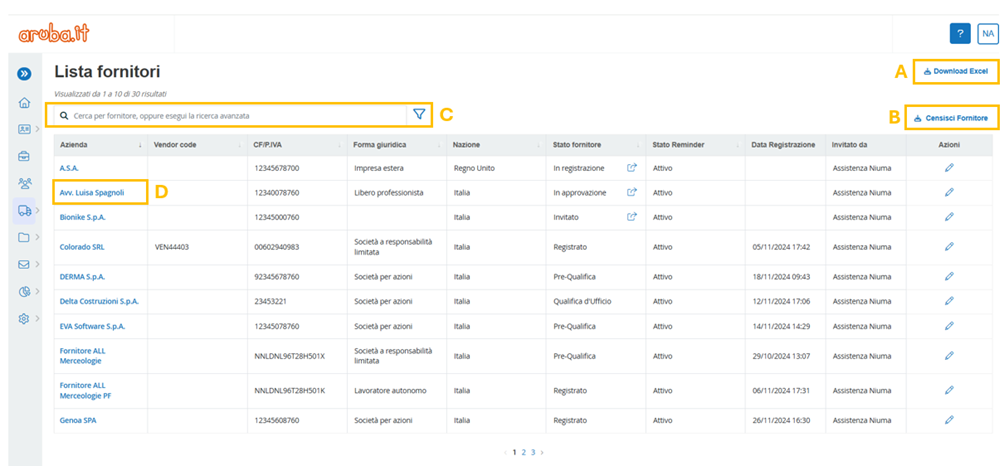
Figure 1. Aruba S.p.A. Portal: ‘Companies’ section
This census requires the entry of some mandatory fields marked with an asterisk (*) on the page entitled ‘Supplier Census’ (ref. Figure 2). By clicking on the ‘Save’ button in the bottom right-hand corner, the system allows the supplier to be saved in the table, visible in the Action section with the status ‘Census’.
Please note that, should the user wish to invite the supplier surveyed to undertake the qualification process, it will be necessary to click on the appropriate icon:  and the system will automatically send the registration token to the supplier.
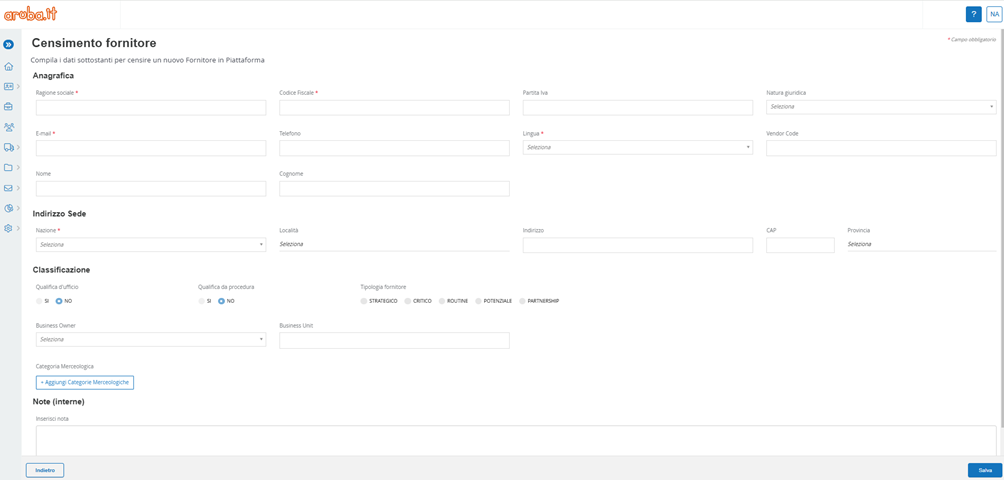
Figure 2. Aruba S.p.A. Portal: ‘Companies’ Section - Supplier Census
Was this article helpful?
That’s Great!
Thank you for your feedback
Sorry! We couldn't be helpful
Thank you for your feedback
Feedback sent
We appreciate your effort and will try to fix the article