To complete the registration process, the supplier must fill out various forms necessary to outline their company profile.
Registration is initiated via an invitation sent by email.
To proceed with registration, it is necessary to go to the Login page, click on the "Create an account" button (A) (see Figure 1).
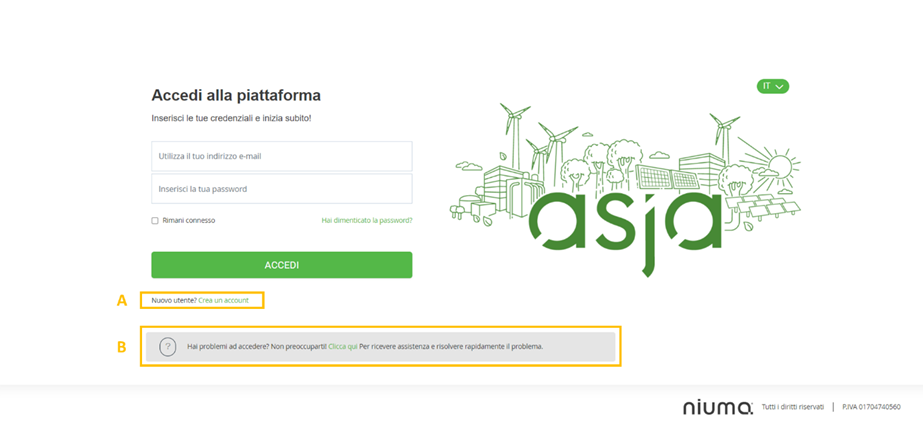
Figure 1. Asja Portal: Login Page
Subsequently, a window will open where the pre-activation code (token) received via email should be entered. By clicking on the "Proceed" button (A) (see Figure 2), the user will be directed to the registration form.
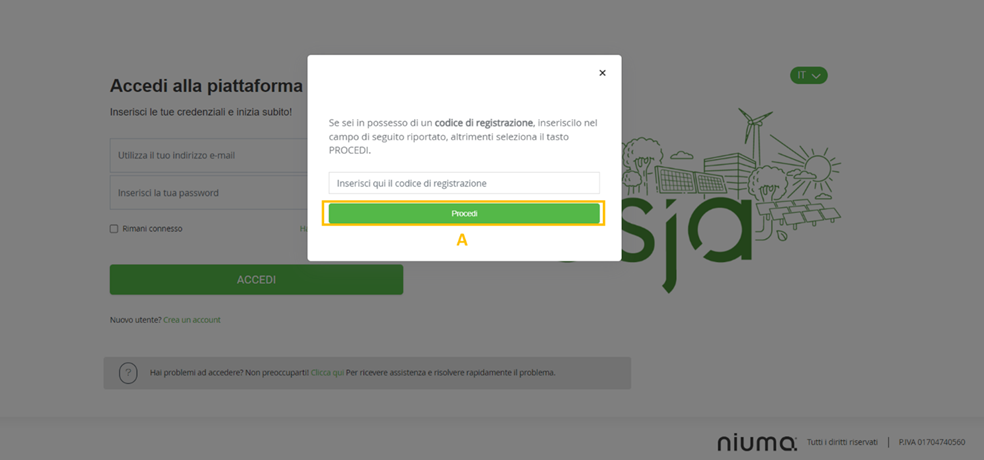
Figure 2. Asja Portal: Token Input Pop-up
If the supplier needs assistance, they can click on the link within the statement: "Having trouble accessing? Don’t worry. Click here to get assistance and quickly resolve the problem." (B) (see Figure 1). By clicking on this link, the supplier will be directed to a new browser window where they can consult instructions for accessing the platform or request assistance by opening a specific ticket.
In the registration forms, fields marked with an asterisk (*) are mandatory; however, it is recommended to complete all fields to provide Asja with as much information as possible about the supplying company.
To submit and save each form, click on Save and continue in the bottom right corner. If the registration process needs to be paused, click Exit. Once the registration has been paused, it can be resumed at any time by re-entering the token code.
Please note that the token code is temporary and is valid for 30 days.
The registration form consists of 3 modules and a final section where the Legal Clauses, which the supplier must acknowledge, are outlined:
- Module 1: Company Information
- Module 2: Product Categories
- Module 3: Documentation
In the following sections, the information to be entered in each module will be described.
Module 1: Company Information
In the first module "Company Information" (see Figure 3), the following can be done:
- Enter the required data to complete the company profile;
- Accept the Privacy Policy by checking the corresponding box.
After completing all fields, click Save and continue (A) (bottom right - see Figure 3) to proceed with the registration.
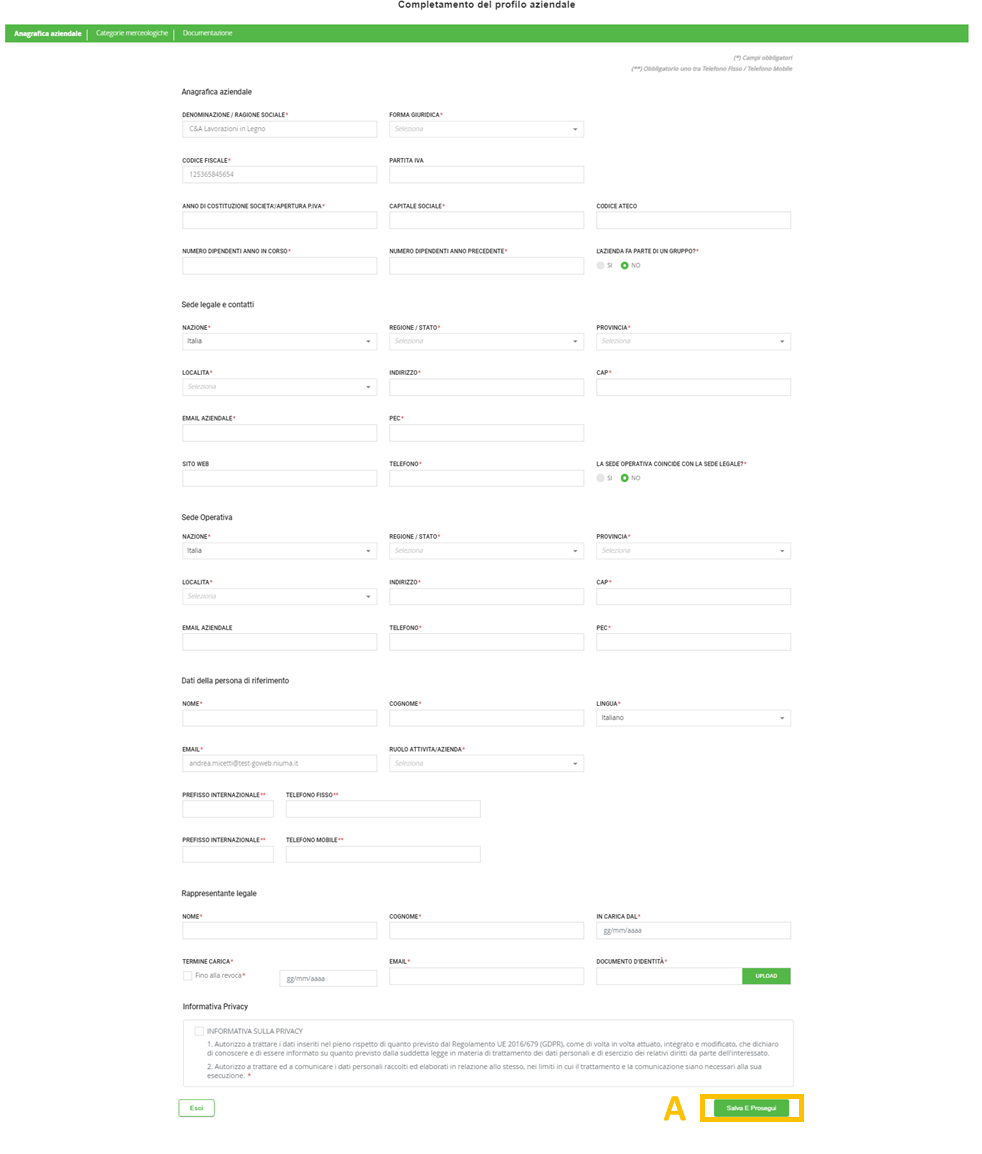
Figure 3. Asja Portal: Registration Flow - Company Information Form
Module No. 2: Merchandise Categories
In the second module, "Merchandise Categories," the supplier must select one or more merchandise categories to which their products and/or services belong. The questionnaires presented in the subsequent Qualification phase will depend on the categories entered in this module (see Figure 4).
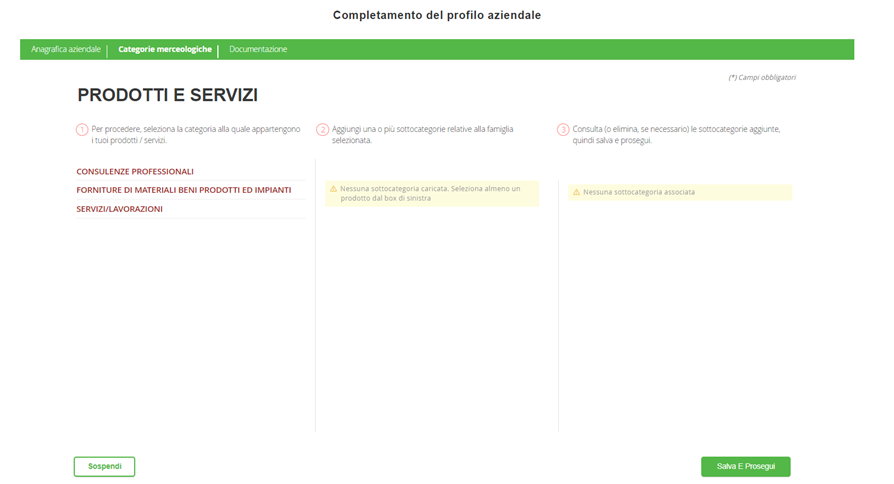
Figure 4. Asja Portal: Registration Flow - Merchandise Categories Module
After selecting the merchandise category (A), the supplier can choose the related subcategory (B) associated with the selected family by clicking the corresponding (+) button (see Figure 5).
The selected subcategory will appear in the third column (C) and can be removed by clicking the delete button .
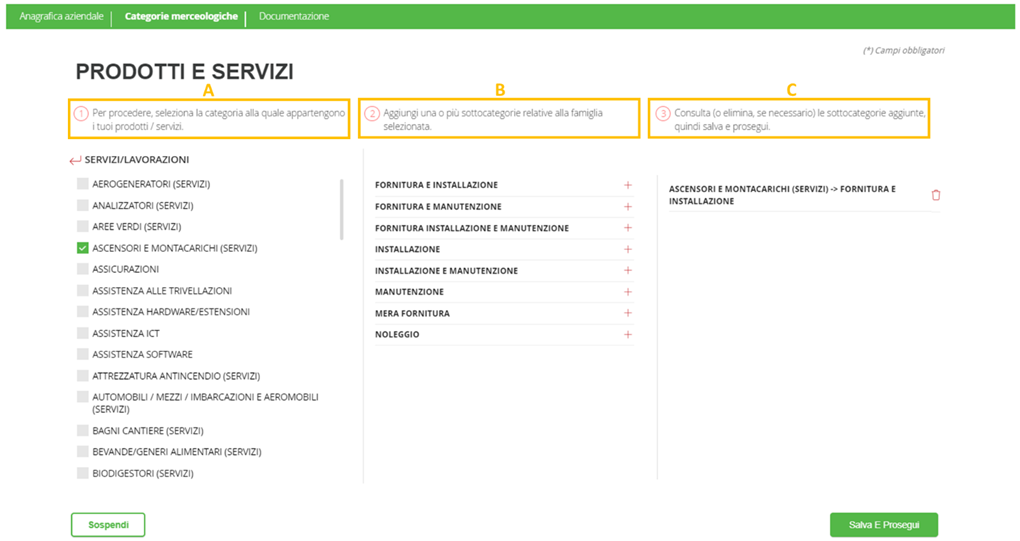
Figure 5. Asja Portal: Registration Flow - Selection of Merchandise Categories and Subcategories
Once the merchandise categories are selected, click Save and Continue to proceed with the registration.
Module No. 3: Documentation
In the third module, "Documentation," the supplier must upload the requested documents necessary to complete the registration process.
Documents may be either mandatory (e.g., DURC or Chamber of Commerce certificate) or non-mandatory (e.g., company brochure or client portfolio).
In the Status column of the table (A) (see Figure 6), several informational labels may be displayed:
To be uploaded: if the supplier has not yet attached the required documentation;
In progress: visible when the supplier uploads a document that is currently valid.
In this section, the supplier can upload the required documents using the upload icon and download previously uploaded documents using the download icon in the Actions column (B) (see Figure 6).
Additionally, the supplier can view the history of all uploaded documents – if multiple documents have been uploaded – by clicking the history icon in the History column (C) (see Figure 6).
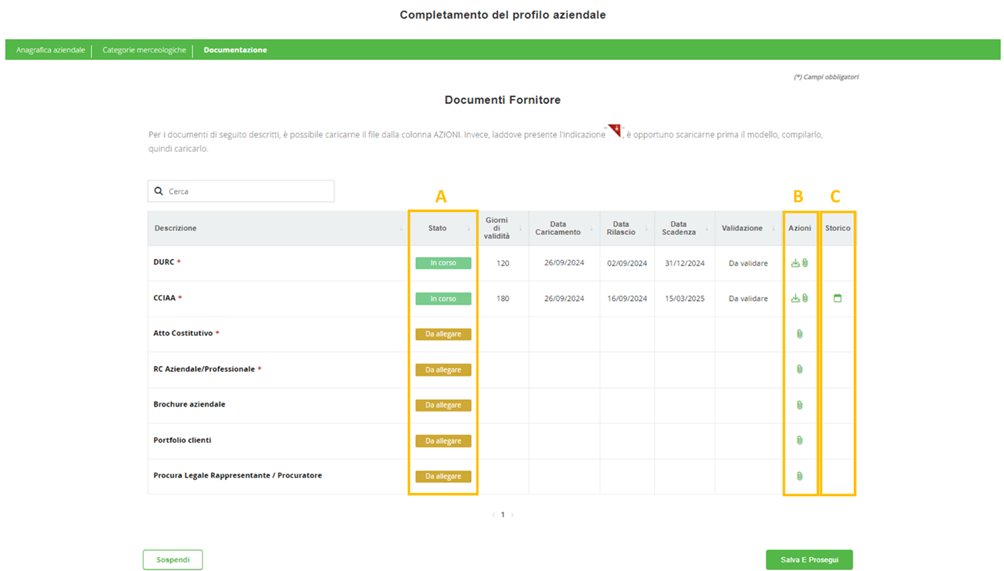
Figure 6. Asja Portal: Registration Flow – Document Section
Once the documents are uploaded, click Save and Continue to finalize the registration.
Conclusion e Submission
At the end of the registration process, the supplier must confirm they have reviewed and accepted the following clauses:
• Supplier Declarations and Guarantees:
o The Supplier declares and guarantees to: (i) act in a manner that safeguards the freedom, equality, and dignity of all human beings; (ii) protect labor rights, working conditions, union freedom, health and safety at work, and the environment; (iii) reject all forms of discrimination, violence, harassment, corruption, forced labor, or child labor.
o The Supplier declares and guarantees:
They are not subject to suspension measures under Article 14 of Legislative Decree 81/08 and amendments, i.e., provisions from the Ministry of Labor aimed at combatting irregular work or mitigating risks to workers' health and safety.
Their company will promptly inform Asja Ambiente Italia S.p.A. of any changes to the data and declarations provided in this module.
Neither the company nor its legal representatives are subject to the prohibitions, revocations, or suspensions listed in Article 67 of Legislative Decree No. 159/2011 and subsequent amendments.
They authorize the processing of personal and/or sensitive data under Regulation EC No. 2016/679 (GDPR). In the case of an assignment as a tester, the supplier declares to have the required educational qualifications and professional certification under current law and to have worked in the relevant sector for the required period.
• Environmental Responsibility: Asja asks its suppliers to commit to:
o Conducting their activities responsibly towards the environment, minimizing their environmental impact as much as possible.
o Complying with all legal requirements on environmental protection and pollution prevention.
o Holding all necessary permits, licenses, and authorizations as required by law. Suppliers are also asked to ensure that their supply chains adhere to the same environmental standards.
• Ethical and Organizational Model:
Suppliers must acknowledge and agree to abide by the Code of Ethics and the Organizational Model of Asja Ambiente Italia S.p.A.
• Supplier Evaluation Notice:
Suppliers are informed that Asja uses a vendor rating process to periodically evaluate supplier performance, determining if a supplier remains qualified for future projects or should be excluded from the Supplier Register.
The evaluation is based on parameters such as price, production capacity, quality, quote and delivery times, and collaboration, all weighted and measured by various internal departments.
Some of these clauses can be downloaded by clicking the appropriate link.
To accept, the supplier must check the box corresponding to each legal clause.
Once all clauses are selected , click Submit (A) to complete the registration (see Figure 7). If the supplier clicks Suspend (B), the registration process will be paused and can be resumed later using a token.
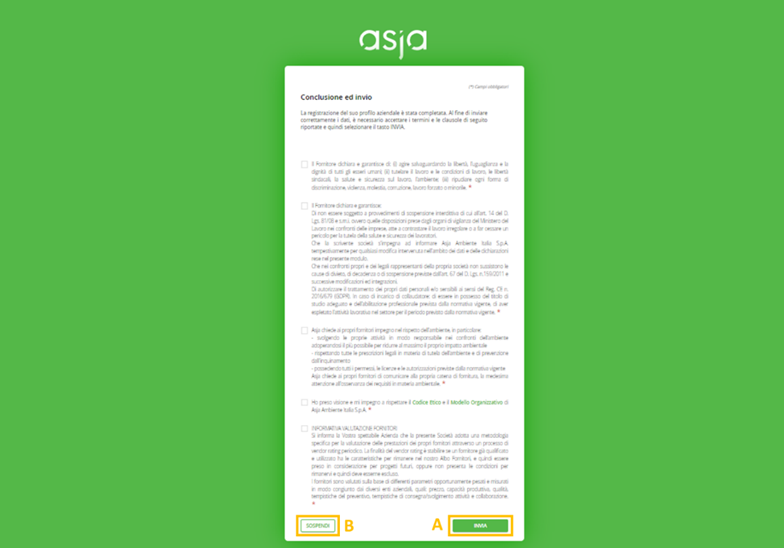
Figure 7. Asja Portal: Registration Flow – Legal Clauses
If the registration process is successful, the page shown in Figure 8 will appear with the following message:
"Thank you for completing the registration! You will soon receive communication with all the necessary information and details regarding the next steps. Click 'Close' to complete the process."
Click Close (A) to finish (see Figure 8).
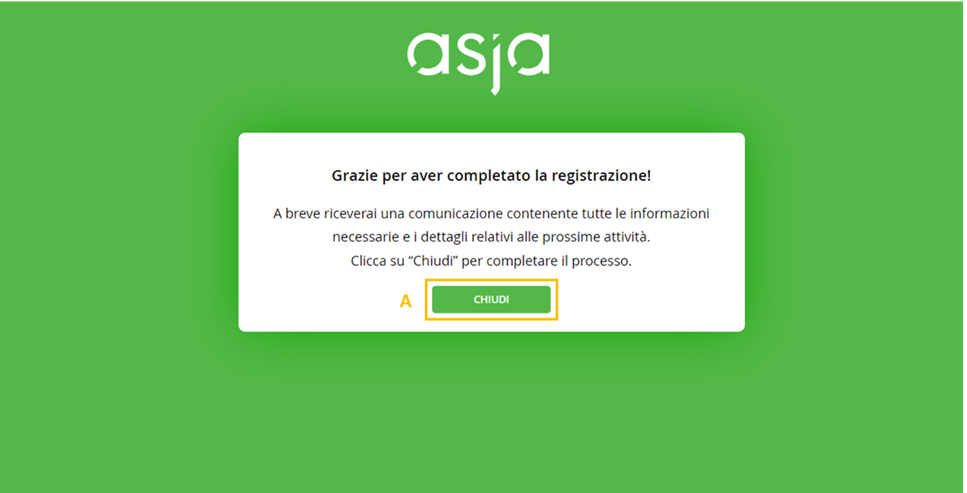
Figure 8. Asia Portal: Registration Completed
After submission, the supplier will receive login credentials (username and password) via email for future platform access. Please note that the token will no longer be valid.
Was this article helpful?
That’s Great!
Thank you for your feedback
Sorry! We couldn't be helpful
Thank you for your feedback
Feedback sent
We appreciate your effort and will try to fix the article