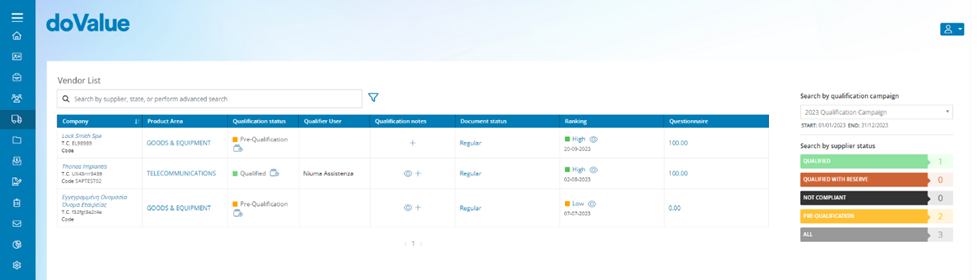
For each supplier who has completed the Qualification Questionnaires and attached all required documentation, this section provides the following information:
- Company: Supplier’s company name.
- Product Area: The internal user can access detailed information regarding the supplier's reference commodity categories by clicking them.
- Qualification Status: Supplier’s status [Pre-Qualification, Qualified, With Reserve, Not Compliant]
- Qualifier User: The name of the internal user responsible for supplier Qualification
- Qualification Notes: By clicking the icon, the internal user can enter notes that can later be viewed through the icon.
- Document Status: This field indicates the status of the supplier's document file. Clicking on the Regular/Irregular status will allow the internal user to access the documents uploaded by the supplier.
- Ranking: This indicates the rating index [Low/Medium/High] assigned to the supplier based on the total score from the Qualification phase. Clicking on the index will allow the internal user to view the detailed scores that make up this rating.
- Questionnaires: By clicking the icon, the internal user can access the view of the questionnaires along with the relevant scores totalled by the supplier.
The information in this section can be both viewed and downloaded in XLS format by clicking the button.
Once the qualification process is completed, which includes filling out questionnaires and uploading required documents, the vendor's status will be set to Pre-qualification. In this status, the vendor awaits validation of the documents submitted during the qualification process by an internal doValue GR user.
Was this article helpful?
That’s Great!
Thank you for your feedback
Sorry! We couldn't be helpful
Thank you for your feedback
Feedback sent
We appreciate your effort and will try to fix the article