In the Registration Invitation section of the portal it is possible to attribute the Qualification By Defautl to the supplier by using the appropriate flag (A) (ref. Figure 1).
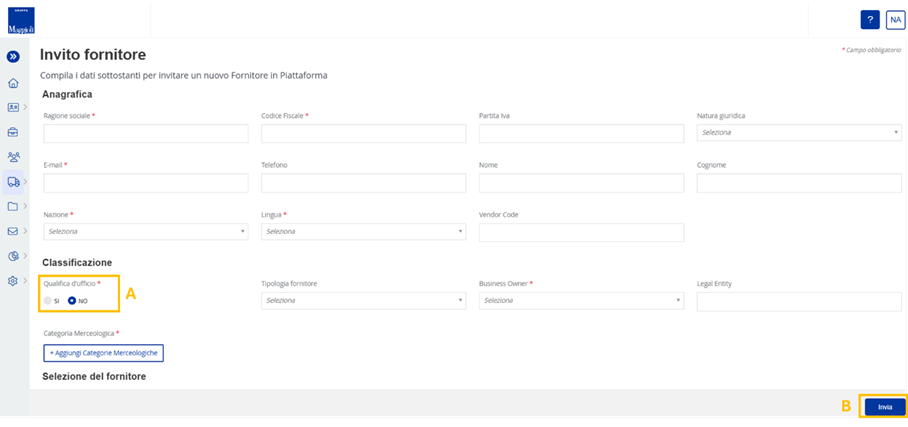
Figure 1. Maggioli Portal: Registration Invitation
Depending on the selection of the flag, the qualification process may change for the supplier:
- Flag Qualification By Default = NO; the supplier will receive the registration code for filling in the registration form. Once the form has been completed, the system will send the login credentials with which the supplier can access in to the platform and fill the questionnaires and the required qualification documentation.
- Flag Qualification By Default = YES; the supplier will receive the registration code for filling in the registration form. nce the form has been completed, the system will send the login credentials with which the supplier can access in to the platform. the supplier will not have visibility of the questionnaires and qualification documents. Consequently, after registration, the supplier will be entered directly into the Vendor List with the status ‘Qualified by Default’.
It should be noted that, if the supplier has been invited to the platform without the flag on the Qualification By Default, the internal user has the option to change the flag at any time for suppliers with the following statuses: Invited, Registration in Progress and Registered.
In this case, the supplier, upon login into the portal, will have no visibility of either the questionnaires or the required qualification documents and, therefore, will be placed into the Vendor List with the status ‘Qualified’ By Default'.
Was this article helpful?
That’s Great!
Thank you for your feedback
Sorry! We couldn't be helpful
Thank you for your feedback
Feedback sent
We appreciate your effort and will try to fix the article